PH今日热榜 | 2026-09-28

TOP1
MCP Connectors by Databox
精选 ▲ 450

MCP Connectors by Databox

Give your AI Analyst context to explain performance and act

Connect your AI Analyst to the tools your business runs on. It pulls context from your CRM or support desk, so every answer reflects what's happening in your business, and it can act on what it finds. Choose from 10+ connectors or add any MCP server.


  • your
  • AI
  • Analyst
  • context
  • business
  • what
TOP2
SaleSmartly
精选 ▲ 316

SaleSmartly

Turn conversations across every channel into customers

SaleSmartly brings customer conversations from WhatsApp, Instagram, Messenger, TikTok, Telegram, LINE, WeChat and more into one workspace. Manage leads with a built-in CRM, let AI agents answer questions and qualify customers 24/7, translate conversations in real time, and automate follow-ups—all while your team keeps the context needed to turn more conversations into customers.

  • conversations
  • into
  • more
  • customers
  • Turn
  • across
TOP3
Statable Analytics
精选 ▲ 310

Statable Analytics

Web analytics built for you and your AI agents

Statable is web analytics built for humans and AI agents. Use the simple dashboard yourself, or connect Claude, ChatGPT, Cursor, Codex, and other agents through MCP to read reports, analyze traffic, and configure tracking, goals, and funnels. No cookies, no analytics consent banner in most cases, and your data stays hosted in the EU.

  • analytics
  • built
  • your
  • AI
  • agents
  • Web
TOP4
Vitals 
精选 ▲ 289

Vitals 

A Mac activity monitor that thinks in apps, not processes

Activity Monitor lists a thousand processes, a hundred of them called Google Chrome Helper. Vitals adds every helper to the app that launched it, so you see 60 apps instead of 1,000 processes, each with one figure for memory, CPU, energy, disk and network. It keeps 30 days of history, alerts you when an app misbehaves, finds forgotten dev servers, and shows temperatures, fans and battery. Every readout can sit in your menu bar, arranged your way. Pay once. No subscription, no account.

  • apps
  • processes
  • app
  • your
  • Mac
  • activity
TOP5
VibeDefend by CybeDefend
精选 ▲ 270

VibeDefend by CybeDefend

The one command line to secure your Cursor and Claude Code

VibeDefend installs on your AI coding agent (Claude Code, Cursor, Windsurf, Copilot, Codex and more) with one command. From then on the agent writes with your business rules, mined from your repo, and your security rules in its context. It scans each diff while the file is still open, and a guard refuses rm -rf, sudo or a read of your secrets before it runs. Scanners check code after the commit, this runs before the line is written. Free plan, no card.

  • your
  • command
  • line
  • Cursor
  • Claude
  • agent
TOP6
Okara
精选 ▲ 200

Okara

The world's first AI CMO

Okara is an AI CMO. Enter your website and it studies your product, competitors and brand voice, then runs 10+ agents for SEO, AI search, Reddit, X, LinkedIn, creators and UGC video. You approve every draft and it publishes. Used by 100,000+ businesses.

  • AI
  • your
  • world
  • first
  • CMOOkara
  • CMO
TOP7
GenCode
精选 ▲ 131

GenCode

A coding agent inside the Genspark Super App

GenCode is Genspark’s coding agent with Chat and Terminal UIs. It supports models from Claude, GPT, Gemini, DeepSeek, and more, and works directly on code in a directory you choose.

  • coding
  • agent
  • Genspark
  • inside
  • Super
  • AppGenCode
TOP8
Shotcandy
精选 ▲ 131

Shotcandy

Make Your Screenshots Look Amazing

Paste a screenshot. Get something lovely. Shotcandy is a free screenshot beautifier that turns plain screenshots into beautiful, share-ready images and videos in seconds, right in your browser.

  • screenshot
  • Make
  • Your
  • Screenshots
  • Look
  • AmazingPaste
TOP9
Microsoft Copilot
精选 ▲ 129

Microsoft Copilot

The Al built for work

The new Copilot connects the tools people rely on with the next generation of capabilities they’ll need to build, customize and scale AI across work. Copilot connects with your work content and the apps you already use, bringing together the latest AI models to help you create finished work, not just answers.

  • work
  • Copilot
  • connects
  • AI
  • Al
  • built
TOP10
Dina 4.5
精选 ▲ 122

Dina 4.5

Beautiful screen recordings, screenshots, and 3D motion

Record your screen, capture beautiful screenshots, add cinematic 3D motion and perspective, customize every detail, and share instantly with a link. Dina 4.5 brings screen recordings, screenshots, 3D animations, and sharing into one fast, beautifully designed workflow.

  • screen
  • screenshots
  • 3D
  • recordings
  • Beautiful
  • motionRecord
TOP11
Stash
精选 ▲ 101

Stash

Hidden controls for your Mac.

Stash gives your Mac hidden controls that feel like they’ve always belonged there. Beautiful, native-feeling and ridiculously satisfying to use - adjust system controls with tactile sliders and dials, manage windows, and keep your favourite apps within reach through a hidden expandable dock and app launcher. Stash Deck extends the experience to your iPhone, turning it into a tactile remote for your Mac with quick controls, app launching and configurable widgets.

  • your
  • controls
  • Mac
  • Stash
  • hidden
  • tactile
TOP12
Ryu Journal
精选 ▲ 98

Ryu Journal

A journal to help busy minds let go

Ryu means "flow" in Japanese. That's the whole idea. Ryu Journal is a quiet place to put a thought down and let it go. No accounts, no social feed, no pressure — just you and the page. Open it, write what's on your mind, and get back to your day. WRITE, THEN LET GO A clean, distraction-free editor. Tap the plus, write, save. Tap any entry to keep writing. Your week gathers softly into one simple timeline.

  • let
  • no
  • write
  • your
  • Tap
  • journal
TOP13
MuM
精选 ▲ 93

MuM

A reading-first Markdown engine for macOS

Your Markdown lives in a dozen folders. Most of the time you don't want to write — you just want to read one section. Every Markdown tool is a writing app with a preview pane. MuM is the opposite: a native macOS reader with no web engine inside — all AppKit. Several projects open at once, each remembering where you stopped. Cross-project search. Typesetting tuned for CJK as well as Latin. ~0.3s cold start, 1.7 MB download, 100+ fps scrolling a 5 MB document. Open source, MIT.

  • Markdown
  • engine
  • want
  • MB
  • reading
  • first
TOP14
Lattice
精选 ▲ 88

Lattice

Reshape your text across languages while preserving meaning

Lattice reshapes your text through multiple language paths, creating a fresh expression while preserving the original idea.

  • your
  • text
  • while
  • preserving
  • Reshape
  • across
TOP15
vantage.ai
精选 ▲ 80

vantage.ai

See and control what your coding agent does.

Vantage is a free, open-source cost and usage monitor, guardrail and session log for coding agents.

  • coding
  • See
  • control
  • what
  • your
  • agent
TOP16
Mochi
精选 ▲ 78

Mochi

A cute Mac desktop pet that organizes your loose files

Mochi is a little pink blob who lives on your Mac. It floats around, naps, teases you about late nights and carries loose Desktop files into folders (never deletes, undo any move). Pro adds a tiny life sim: a strawberry tree, a nest and a family to raise.

  • Mac
  • your
  • loose
  • cute
  • desktop
  • pet
TOP17
Zerg Router
精选 ▲ 77

Zerg Router

Run DeepSeek in Codex

One OpenAI-compatible endpoint for all your coding agents. The routing policy lives in your account, not inside each tool. • Run DeepSeek 4.1 Flash (or other models) inside Codex, and keep your workflow • Give every API key its own daily budget, enforced per request • Explicit fallbacks: on a 5xx, 429 or timeout, try your next model • See remaining weekly quota and reset dates across Codex accounts Supports paid usage, or bring your own provider keys.

  • your
  • Run
  • DeepSeek
  • inside
  • Codex
  • own
TOP18
Sayble
精选 ▲ 77

Sayble

AI copilot for calls that tells you what to say next

Sayble is a real-time AI copilot for sales calls, client meetings and negotiations. It hears what the other person just said and gives you one clear line to say next, plus a backup, in about half a second. When the call ends, it writes the recap and a ready-to-send follow-up email. Works on Zoom, Meet, Teams and phone calls. Mac & Windows, 10 languages.

  • calls
  • AI
  • copilot
  • what
  • say
  • tells
TOP19
Harness Router
精选 ▲ 77

Harness Router

Fast AI tool routing powered by Jev.

Harness Router is a decision layer for AI coding agents that makes tool selection faster, cheaper, and more reliable before execution. Use it as a Codex hook to automatically route every tool call, or as a skill when the agent should invoke routing explicitly. Obvious decisions stay on the fast path, ambiguous choices are resolved with Jev, and complex multi-step decisions can escalate to MCTS.

  • tool
  • AI
  • routing
  • Jev
  • decisions
  • Fast
TOP20
Arc
精选 ▲ 76

Arc

Your mobile AI assistant on any screen

Arc is a free AI assistant that works on whatever screen you're already on. You don't have to copy text into a chatbot. Call Arc up over any app and it reads the screen for you. • Summarize articles, chats, emails and docs instantly • Listen: have any screen read aloud • Rewrite replies and messages in the right tone, right where you type • Automate repetitive steps across apps Available on Android and Mac. Free to start.

  • any
  • screen
  • AI
  • assistant
  • right
  • Your
TOP21
PIP
精选 ▲ 70

PIP

AI buddy on your computer

Pip is an AI buddy for your Mac. It sees your screen, talks you through it, and points at exactly where to click, even when it takes several clicks.

  • your
  • AI
  • buddy
  • computerPip
  • Mac
  • sees
TOP22
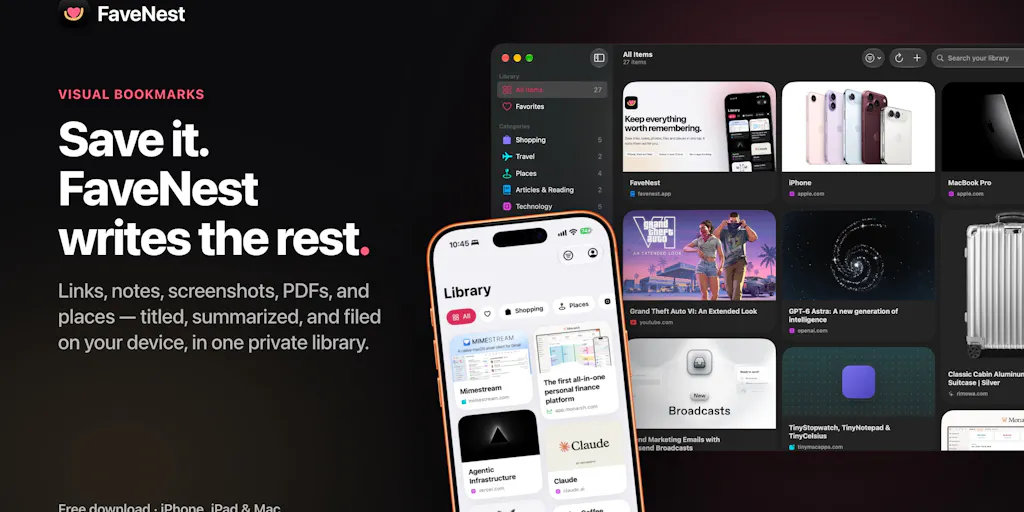
FaveNest
精选 ▲ 70

FaveNest

Bookmarks that organize themselves with Apple Intelligence

FaveNest is a visual library for the links, notes, screenshots, PDFs, and places you save. Share from any app or click the heart in Safari, and Apple Intelligence writes the title, summary, and tags on your device, so nothing you save is sent off to be read. No account, no FaveNest server: your library syncs through your own iCloud. Native on iPhone, iPad, and Mac. Saving, sync, search, and export are free; Pro (7-day free trial) adds the AI, on device or with your own OpenAI or Anthropic key.

  • your
  • Apple
  • library
  • save
  • device
  • own
TOP23
Accessibility Checker by WebYes
上榜 ▲ 54

Accessibility Checker by WebYes

Check any webpage for Accessibility issues, right in Chrome

Accessibility Checker by WebYes is a free Chrome extension for testing webpages against WCAG 2.0, 2.1, and 2.2, with support for ADA, EAA, and Section 508 requirements. Scan a page, review issues by severity, inspect affected elements and code, and go beyond automated checks with tools for color contrast, focus order, alt text, headings, and landmarks. Explore different user experiences with disability simulators and export detailed reports to share with your team.

  • issues
  • Check
  • any
  • webpage
  • Accessibility
  • right
TOP24
DOFOTT
上榜 ▲ 48

DOFOTT

Meetings need time. Getting there does too.

DOFOTT adds travel time to Google Calendar: a block before and after every event with a place, with real Google Maps durations. Shows up in Notion Calendar, Apple, Akiflow and more. Private: reads only time and place. No titles, no attendees, no tracking cookies. Fair: 12 meetings a month free. Busy month? $5, then unlimited. Quiet month, $0. Public: our numbers are live at dofott.com/built-in-public.

  • time
  • month
  • Google
  • Calendar
  • place
  • no
TOP25
TruLata
上榜 ▲ 21

TruLata

The AI marketing platform for service businesses

TruLata is self-serve AI marketing software for local service businesses. Sign up, connect your accounts, and it runs your website, search, Google and Meta ads, content and email on a schedule. Every lead lands on one screen with where it came from and what it cost. A form that stops sending gets flagged the next morning, and you can see where you show up in ChatGPT, Gemini, Claude and Grok answers. Build your website free, no card.

  • your
  • AI
  • marketing
  • service
  • up
  • website
TOP26
Nook
上榜 ▲ 18

Nook

A quiet Mac browser that shows the article, not the clutter

You open a page to read one article and get a cookie banner, a video that starts on its own, and a prompt to sign in. Nook shows the article. Ads and trackers are blocked from the first page you open, reader mode keeps the text and pictures, and focus mode hides the tabs and toolbar. Cookies and cache are cleared when you quit. No account, no sync, no telemetry. macOS 13+, Apple silicon and Intel. Free.

  • article
  • shows
  • open
  • page
  • mode
  • no
TOP27
FramioCam
上榜 ▲ 17

FramioCam

Screenshot & screen recording studio for Chrome

FramioCam is a screenshot and screen recording studio built for people who explain things on screen. Capture a tab, window, full page, selected area, or your entire screen. Then edit it with annotations, backgrounds, device frames, zooms, cursor effects, webcam, transitions, and a real video timeline. Export polished screenshots and videos without switching between multiple tools. Your captures are processed locally on your device.

  • screen
  • recording
  • studio
  • your
  • device
  • Screenshot
TOP28
Montty
上榜 ▲ 15

Montty

AI Finance teammate for your business

Montty is an autonomous financial operating system designed to replace traditional bookkeeping and reactive financial analysis with an end-to-end AI brain. By automating the heavy lifting of data entry and transaction categorization, Montty frees founders from manual screen-tapping and human errors.

  • AI
  • financial
  • end
  • Finance
  • teammate
  • your
TOP29
Nowly
上榜 ▲ 14

Nowly

Share what you do.

Nowly automatically shows what you are doing online in your Discord Rich Presence status. With a browser extension, it detects what you watch, listen to, or browse, and shares it in real time with your Discord friends: title, channel, progress, and clickable buttons.

  • what
  • your
  • Discord
  • Share
  • do
  • Nowly
TOP30
Wyro
上榜 ▲ 14

Wyro

Draw your backend. Export TypeScript you actually own.

Your backend, drawn not typed. Wyro compiles the canvas into production TypeScript — Express, Drizzle, Zod — then gets out of the way. No SDK, no hostage situation. Delete your account; your app won't flinch. Free tier, no card.

  • your
  • backend
  • TypeScript
  • no
  • Draw
  • Export